
To run Netpicker in your environment, certain network ports must be allowed through your firewall. This article explains the required and optional ports used for communication between users, the Netpicker server, and managed devices.
Network Flow Diagram
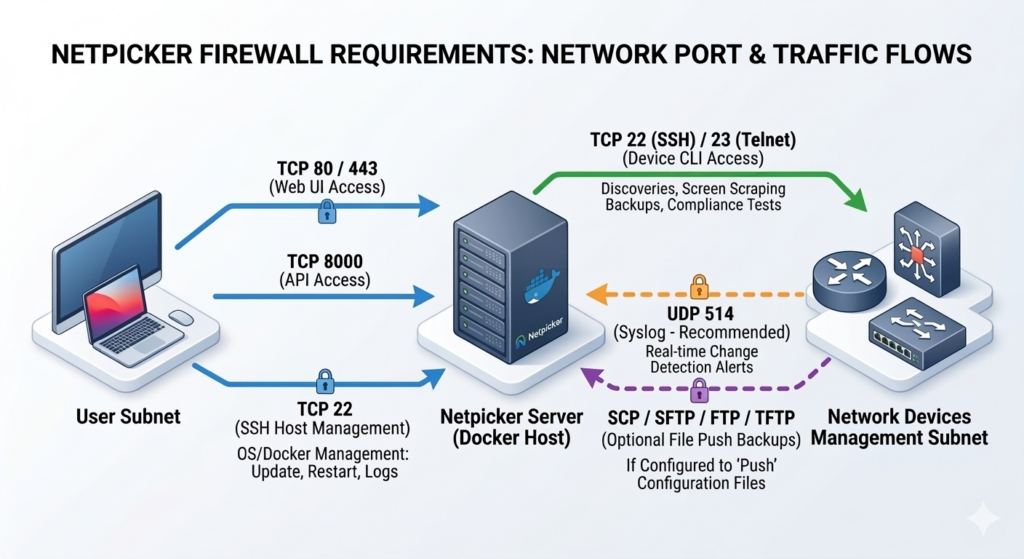
Port Requirements Summary
| Purpose | Protocol / Port | Source | Destination | Required |
|---|---|---|---|---|
| Frontend (Web UI) Access | TCP 80 / 443 (HTTP/HTTPS) | User Subnet | Netpicker Server | ✅ Mandatory |
| Netpicker CLI / Management Access | TCP 22 (SSH) | User Subnet | Netpicker Server | ✅ Mandatory |
| Netpicker to Network Devices | TCP 22 (SSH) / TCP 23 (Telnet) | Netpicker Server | Network Devices Management Subnet | ✅ Mandatory |
| Configuration Backup File Transfer | SCP / SFTP / FTP / TFTP | Network Devices Management Subnet | Netpicker Server | ⚙️ Optional |
Frontend (Web UI) Access — Port 80 / 443
Users access the Netpicker web interface through a browser. Ports 80 (HTTP) and 443 (HTTPS) must be open from the user subnet to the Netpicker server. HTTPS (443) is recommended for secure access.
CLI / Management Access — Port 22 (SSH)
Allow TCP port 22 (SSH) from the user subnet to the Netpicker server for administrative access. This is used for tasks such as updating or restarting the Netpicker application and collecting logs for troubleshooting.
Netpicker to Network Devices — SSH / Telnet
Allow TCP ports 22 (SSH) or 23 (Telnet) from the Netpicker server to the network devices management subnet to enable device management. SSH is recommended.
Configuration Backup File Transfer — SCP / SFTP / FTP / TFTP (Optional)
This access is required only if we have to push configuration backup files from devices to the Netpicker server. Depending on device support, the following protocols may be used: SCP, SFTP, FTP, or TFTP.
Note: This configuration is optional. Netpicker can also perform configuration backups through CLI screen scraping, which does not require file transfer access.