
Stop postponing OS upgrades
AI has changed the risk of running old firmware. Vulnerabilities can be found, matched and exploited faster, at greater scale.
Netpicker helps you automate OS upgrades safely, from version discovery to verified rollout.
AI changed the risk of waiting
For years, postponing network OS upgrades was a rational decision. If a router, switch or firewall was stable, touching it often felt more dangerous than leaving it alone.
But that balance is shifting.
AI is making it easier to analyze vulnerabilities, connect them to known software versions and turn that knowledge into working attacks. What used to require deep vendor knowledge can now move faster, with less effort, and at much larger scale.
That does not mean network teams should start upgrading recklessly. It means OS upgrades need to become more controlled, more repeatable and easier to validate.
Netpicker helps teams move from “we should upgrade this someday” to a workflow they can actually run.
Old firmware is no longer invisible risk
The answer is not faster panic.
The answer is safer automation.
Why network OS upgrades are still hard
Network teams do not postpone upgrades because they ignore risk. They postpone them because the network is different: long-lived hardware, short maintenance windows, vendor-specific steps and very little room for mistakes.
“If it runs, don’t touch it.”
The caution is rational. A failed upgrade can mean downtime, rollback stress or a device that does not come back.
Maintenance windows are scarce.
Network changes often happen late, under pressure and with very little room for trial and error.
Every vendor is different.
Cisco, Juniper, Aruba, Fortinet and older platforms all have their own steps, prompts and protocol limits.
Scripts don’t scale.
Personal scripts work until the model changes, the engineer leaves or audit asks for proof.
First, know what is actually running
Before you can upgrade anything safely, you need a reliable view of the OS versions running across your network.
Netpicker keeps version data current automatically through SNMP scans, so your inventory never drifts, and turns it into a practical upgrade plan.
No spreadsheets. No guessing. No “we think these switches are still on that release.”
Download Netpicker and scan your first devices →The first win is not the upgrade itself.
It is knowing which devices are outdated, which versions may be linked to CVEs, and where to start first.
| Device | OS version | Status |
|---|---|---|
core-sw-01 Cisco IOS XE |
17.9.x | Current |
edge-fw-04 Fortinet |
7.0.x | Review |
access-44 ArubaOS |
8.10.x | Candidate |
From risky change to repeatable workflow
Netpicker guides OS upgrades through the same controlled process every time. Check before anything changes. Verify after every reboot.
Pre-check
Check current OS version, memory, disk space, device health and upgrade readiness before the maintenance window starts.
Stage
Upload and manage OS images directly in Netpicker. Use the transfer method your devices actually support.
Upgrade
Run the upgrade job with controlled steps, scheduling and clear execution logs for every device.
Verify
Confirm the device came back online, runs the intended version and still passes your network tests.
No “push button and hope”.
Netpicker gives every OS upgrade a clear before, during and after — with checks, logs and validation built into the workflow.
Built for real networks
Including the old devices you still depend on
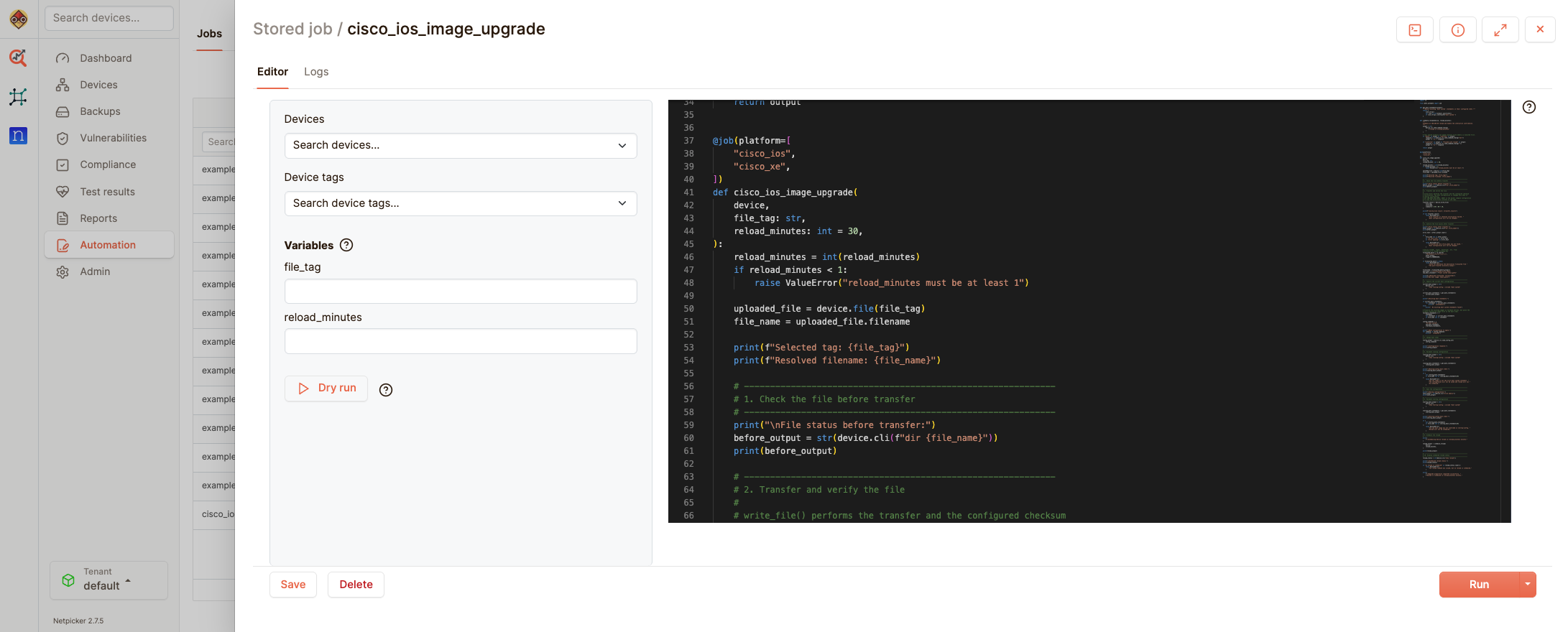
Modern devices may support clean upgrade flows over HTTPS. But real networks are rarely that simple. Many teams still run older switches, mixed vendors and device generations with different upgrade behaviour.
Netpicker is built for that reality. Upload and manage OS images in one place, then use the transfer method your devices actually support.
Don’t stop at knowing you are vulnerable
Most tools tell you there is a problem. Netpicker connects a new CVE to the affected devices within a day - then to a controlled upgrade plan.
Detect
Know which devices a new CVE hits, usually within a day of release
Prioritize
Group affected devices by vendor, model, version or risk.
Test
Validate the upgrade job on a lab device or small pilot group.
Roll out
Run controlled upgrade waves during approved maintenance windows.
Verify
Confirm the device came back healthy and runs the intended version.
The goal is not just to find CVEs.
The goal is to close the loop safely: know what is affected, upgrade with control, and prove the result afterwards.
Keep Python flexibility. Add platform control.
Your team can probably script OS upgrades. Many network teams already do.
But scripts become risky when they live in personal folders, depend on one engineer’s memory, or need to run across hundreds of devices, vendors and maintenance windows.
Netpicker does not replace your engineering knowledge. It gives that knowledge a controlled place to live: reusable jobs, scheduling, role-based access, logging and automated verification.
From personal scripts to shared workflows
Use scripts where they make sense. Control them where it matters.
Netpicker turns upgrade logic into a workflow your whole team can use, review and repeat.
Stop postponing OS upgrades
Download Netpicker for free and see how your team can discover OS versions, identify risk and run controlled upgrade workflows.