
Network testing: continuously validate your network
Netpicker helps engineers run automated pass/fail tests against configs, compliance policies, CVE exposure, and network intent.
- Continuous network validation
- Python, AI, or no-code checks
- Git-backed configs and test history
- 180+ vendors supported
What is network testing?
Network testing is the practice of defining the expected state of a network and continuously verifying that the actual state matches - using automated pass/fail checks against device configuration, command output, and behavior.
Unlike network monitoring, which detects changes after they happen, network testing proactively catches misconfigurations, compliance violations, and vulnerabilities before they cause incidents. Netpicker is built on pytest so network engineers can test infrastructure the same way software engineers test code - turning network validation, compliance checks, and network assurance into repeatable automated tests.
Why network testing is different from monitoring
| Network monitoring | Network testing | |
|---|---|---|
| Question answered | Did something change? | Is it correct right now? |
| Timing | Reactive - after the fact | Proactive - continuous |
| Output | Alerts and metrics | Pass / fail per device |
| Catches | Outages and anomalies | Misconfigs, drift, CVEs |
| Framework | Vendor dashboards | Open Python / pytest |
| Data ownership | Vendor platform | Git - yours forever |
Monitoring tells you the network is up. Network testing tells you the network is correct.
From validation to remediation
Netpicker executes tests against the actual state of your network and returns structured pass/fail results.
Collect
Configs, CLI output, API data, and external sources across 180+ vendors.
Define
Write tests in Python, build them in the UI, or use the AI assistant.
Run
Run continuously, on schedule, or triggered by syslog events, API calls or webhooks.
Review
See pass/fail results per device, per test, and per severity.
Fix
Use automation jobs to remediate failures with full control.
Verify
Re-run tests automatically and confirm the fix worked.
What you can test
Apply the concept of unit testing and CI/CD pipelines to networking.

State
Detect config drift and validate actual network configuration and behavior.

Compliance
Check CIS benchmarks, internal policies, and audit requirements automatically.

Vulnerability
Find potential and verified CVEs by combining OS version and config analysis.

Intent
Verify network intent by comparing running state against your Source of Truth, Git, or golden configs.
Network testing prevents problems before they become incidents.
Without continuous validation, configuration drift becomes normal, compliance gaps stay hidden, and CVE exposure is discovered manually - usually too late.
Network testing creates a repeatable safety layer: every device, every change, every test result, continuously verified.
Before audits
Catch compliance violations continuously, not only when someone asks for evidence.
Before outages
Detect drift, missing standards, and broken assumptions before they impact production.
Before breaches
Identify potential and verified CVE exposure across your network estate.
Before changes fail
Validate the expected state before and after automation jobs or maintenance windows.
Built for engineers, not developers
Use Python for full control, or use the UI to build tests without writing code.
Python
Use Python for full flexibility
Write tests using pytest to validate configurations, command output, and network data.
Use existing libraries for compliance, CVEs, and design validation or create your own logic.
No code
Or build tests without code
Use the UI to define checks based on command output or data.
No Python required, just define what should match and what should fail.
Type
Command
show arp
Must include the text:
Regular expression?
192.168.60.32
Command output
show arp: Protocol Address Age (min) Hardware Addr Type Interface Internet 192.168.60.2 97 000c.292e.36b6 ARPA Ethernet0/3 Internet 192.168.60.32 214 000c.2987.5096 ARPA Ethernet0/3 Internet 192.168.60.101 196 5000.0001.0000 ARPA Ethernet0/3
Network testing results you can trust
Pass / Fail
Clear results per test, per device.
Detailed Insights
Drill down to configs, commands, and outputs.
History & Trends
Track changes and improvements over time.
Export & Share
Export reports and share results with your team.
devices tested in a production POC.
compliance failures found on 800 core devices.
potential CVEs filtered to verified findings.
Built for teams that need network validation at scale
Legacy replacement
Large teams use Netpicker to replace legacy compliance tooling and convert existing rules into modern Python-based tests.
Network validation at scale
Network teams use network testing to reduce outages and speed up deployments in complex environments.
Pre/post validation
Validate network state before and after changes to ensure consistency, compliance, and deployment quality across your environment.
Define tests in plain English
Describe what you want to validate or fix. Netpicker AI turns it into working tests, remediation ideas, and insights for your team.
# Ensure SSH is not configured
config = device.get_config()
assert "ip ssh" not in config
def test_ntp_servers(device):
config = device.get_config()
assert "ntp server 10.0.0.10" in config
Community-supported libraries
Netpicker includes open-source libraries for compliance, CIS hardening, CVE validation, NIST and design checks.
Use existing tests from the Netmiko device backup library, TextFSM parsers from Network to Code, and the pytest-for-networking repository or extend them with your own logic.
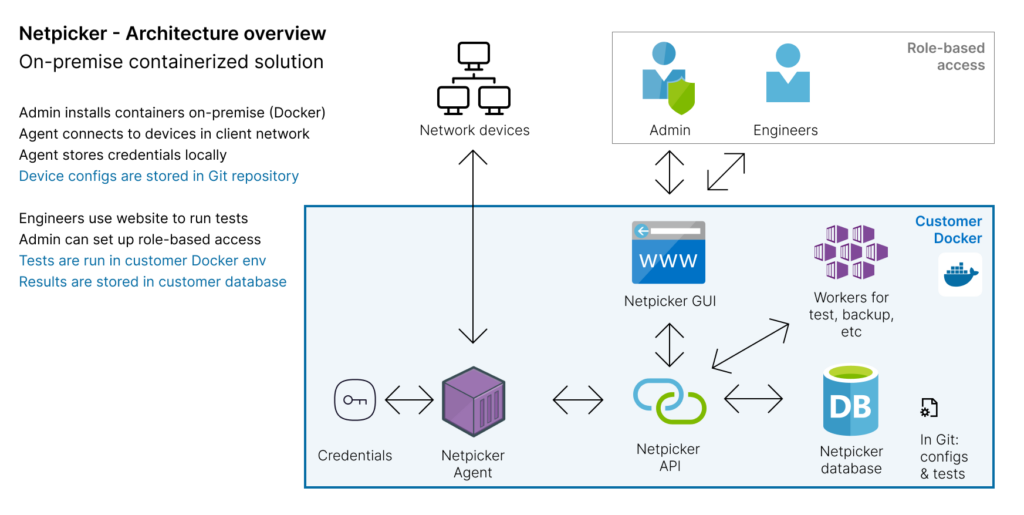
Netpicker is also an active contributor to the Netmiko ecosystem and related open-source networking projects. All tests are version-controlled and stored in Git.
Who uses network testing tools?
Network engineers
Replace manual compliance checks and legacy tools like RANCID and Oxidized.
Security teams
Automate CVE scanning, security validation, and pen test remediation.
MSPs
Run compliance testing across dozens of customer networks from one platform.
Consulting teams
Deliver standardized network assessments at scale.
Telcos
Automate type approval testing before production rollouts.
Financial & government
Meet audit requirements without week-long manual processes.
REST API for automation and integration
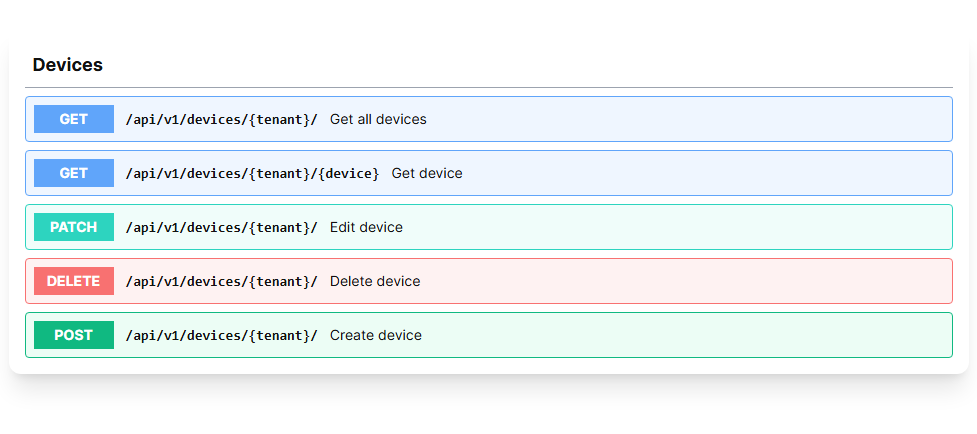
Trigger validations, execute commands, and integrate with your existing tooling or CI/CD pipelines.
Fully documented with OpenAPI / Swagger. You can try it out in our sandbox environment.
Network testing FAQ
What is network testing?
Network testing is the practice of defining the expected state of a network and continuously verifying that the actual state matches - using automated pass/fail checks against device configuration, command output, and behavior.
What is the difference between network testing and network monitoring?
Network monitoring detects changes and alerts on anomalies after they occur. Network testing proactively verifies that the network state matches the expected state.
What is a network testing tool?
A network testing tool automates the verification of network configuration, compliance, and security posture. Netpicker lets engineers define tests in Python or plain English and run them continuously.
What is network test automation?
Network test automation is the process of running validation checks automatically - on a schedule, triggered by events, or as part of a CI/CD pipeline.
What is network intent verification?
Network intent verification compares the actual running state of a network against its intended design, usually defined in NetBox, Nautobot, Infrahub, Git, golden configs, or another source of truth.
What is network assurance?
Network assurance is the ongoing verification that the network is operating according to its intended design, security standards, and operational requirements. Netpicker provides network assurance through automated pass/fail testing, configuration validation, compliance checks, CVE analysis, and intent verification.
Is Netpicker free?
Yes. Netpicker has a free version with unlimited config backups and access to the compliance testing framework. Deploy via Docker in under 10 minutes.
Start testing your network continuously.
Free version. Unlimited config backups. Docker deploy in under 10 minutes. No sales call required.
Test. Validate. Fix.
Everything you need to build a reliable, secure and compliant network.
Config Backup
Automated backups and version control for all devices.
Network Testing
Test configurations, policies and network behavior.
Compliance Automation
Continuously validate against standards and policies.
Security Automation
Find exposure, CVEs and misconfigurations before attackers do.
Network Remediation
Automate fixes with guardrails and verification.
AI Network Automation
AI-assisted workflows for faster analysis and actions.